
Want hills on demand? We tested 8 steep-incline treadmills — which one makes your legs beg for mercy?
We crave hills. Rain or shine, we want the burn of a real climb. No commute. No crowded trails. Just steep, sweaty work at the push of a button.
We tested eight steep-incline treadmills for 2026. We focused on incline range, motor power, deck stability, app smarts, and real-world feel. The result: clear winners for long runs, daily training, and brutal hill sprints.
Top Picks



NordicTrack Commercial 2450 Foldable Treadmill
We were impressed by the Commercial 2450’s combination of a large pivoting touchscreen, wide speed and incline/decline range, and a heavy-duty build. It’s the treadmill we turned to for immersive iFIT sessions, long runs and interval training where stability and range matter.
Pros
- Large pivoting 24" touchscreen for immersive workouts
- Wide speed (to 22 km/h) and -3% to 12% incline/decline
- Heavy-duty frame with high weight capacity
- RunFlex cushioning and excellent program variety
Cons
- Expensive and very heavy — not ideal for small spaces
- Full interactive features work best with iFIT subscription
- Higher price puts it out of reach for budget buyers
This Commercial-series model targets users who want a near-gym experience at home. We tested it through long steady-state runs, interval sessions and trainer-led routes, and it consistently felt stable, responsive and polished. The 24" pivoting touchscreen is a genuine usability win — it makes following trainer-led journeys and off-treadmill sessions much more comfortable.
Standout hardware and software pairing
- 7.5+ HP equivalent performance feel with 0–22 km/h top speed and -3% decline to 12% incline
- Pivoting 24" HD touchscreen that accommodates streaming iFIT workouts and entertainment
- RunFlex cushioning and a robust frame rated for high user weights
That hardware-software combination gave us the confidence to run long workouts and to alternate between performance-focused training and guided classes. The decline feature is rare at this price bracket and is useful for race-specific downhill practice or balanced muscle training.
Practical insights: the treadmill is large and heavy — shipping and installation matter. We’d recommend professional placement or two people for assembly. Also, while the built-in content is excellent, iFIT’s best features are gated behind a subscription; evaluate whether you’ll use the platform enough to justify ongoing costs.
Who this is for
If you want the closest thing to a high-end gym treadmill at home — with a huge screen and interactive classes — this is an easy recommendation. If you’re tight on space or budget, consider smaller models that keep the essentials while trimming the extras.
Bowflex 8.5J Folding Home Treadmill
We appreciated the Bowflex 8.5J for its large cushioned deck, quiet motor and flexible connectivity options — including JRNY and FTMS app compatibility. It’s a strong all-rounder for runners who want app integration and reliable everyday performance.
Pros
- Large 152 x 50 cm cushioned deck for comfortable strides
- App and FTMS connectivity (JRNY, Zwift, Kinomap, Peloton)
- Quiet motor with SoftDrop folding for easy storage
- Apple & Galaxy Watch sync for seamless wearable tracking
Cons
- Warranty is only two years from the manufacturer
- Console screen is modest compared with large pivoting displays
- Some advanced features require subscription services
Bowflex’s 8.5J is clearly designed for the home user who wants flexibility — long runs, interval work and app-driven coaching all feel natural on the large cushioned deck. We found the deck width and cushioning especially comfortable for daily use and for users who prefer longer strides.
Connectivity and user experience
- 20 km/h top speed with 12% incline and a 152 x 50 cm running surface
- Built-in programs or connect via Bluetooth FTMS to JRNY, Zwift, Kinomap, Peloton
- Apple & Galaxy Watch sync and two months JRNY trial for new users
We appreciated the freedom to train subscription-free or to plug into multiple ecosystems depending on our mood. The SoftDrop folding frame is quiet and convenient for apartment living, and the console controls are intuitive even if the screen is not huge.
Who benefits most
This treadmill is great for runners and fitness enthusiasts who want a premium-feeling deck and flexible app options without stepping up to a commercial-priced machine. If you require a bright, large display or an extended warranty, you may want to compare with larger commercial models.
XTERRA TRX4500 Folding Smart Treadmill
We found the TRX4500 combines a wide 15% incline range, a large cushioned deck, and FTMS Bluetooth compatibility to be a versatile performer for both runners and walkers. The stable build and 34 onboard programs make it a strong choice for dedicated home users.
Pros
- 15% incline and quick-touch controls for varied training
- Large 51 x 152 cm deck with XTRA Soft cushioning
- Bluetooth FTMS compatibility (Zwift, Kinomap) and 34 programs
- Solid motor and generous warranty for the motor
Cons
- Heavier unit and larger footprint — needs space
- Console is functional but not as bright as tablet-style screens
- Assembly and moving require effort due to weight
The TRX4500 bridges the gap between consumer and performance home treadmills. We appreciated the large running surface and deep cushioning that let us run long sessions with less joint fatigue. The 15% power incline is more ambitious than many home units in this class and is useful for steep-incline training.
Features that matter in our experience
- 3.25 HP motor, speed to 18 km/h and 15 levels of powered incline
- 51 x 152 cm running area, 25 mm deck thickness and XTRA Soft cushioning
- Built-in Bluetooth FTMS support enabling Zwift, Kinomap and app connections
We ran structured workouts on connected apps and used the onboard programs for quick sessions. The treadmill’s responsiveness to quick-touch speed and incline made interval training efficient and precise. The sturdy frame instilled confidence for heavier users and steeper sessions.
Practical considerations
This treadmill is heavy and takes up space — plan for room and assembly time. The console is clear and informative but won’t replace a large HD pivot screen for immersive classes. For those who want robust incline options, app compatibility and a comfortable deck, it’s an excellent balanced pick.
NordicTrack T Series 9 Home Treadmill
We found it balances power, smart features, and price to deliver a versatile platform for walking, running, and incline training. The included touchscreen, adjustable cushioning and iFIT integration feel like more than you’d expect at this price point.
Pros
- Strong motor and 0–20 km/h speed range
- 10" HD touchscreen with iFIT ecosystem
- Adjustable SelectFlex cushioning for comfort
- High user weight capacity and lifetime frame warranty
Cons
- Full iFIT functionality requires a subscription
- Incline maxes at 12% — not the steepest option
- Large footprint and needs assembly
We approached this model as a true home all-rounder — a treadmill that must be ready for walks, interval runs and regular incline sessions without breaking the bank. Overall, it delivers a lot of features you’d expect from pricier machines while keeping the user experience straightforward and dependable.
Key features and what they mean for us
- 3.6 CHP motor with 0–20 km/h top speed for serious running
- 0–12% incline range and SelectFlex cushioning for muscle targeting and joint protection
- 10" tilting HD touchscreen with iFIT streaming and third-party app sync
This combination means we can run a range of workouts — from steady-state endurance to higher-speed intervals — and also follow trainer-led sessions that adjust speed and incline for us. The SelectFlex cushioning is particularly useful on consecutive training days; it reduces impact on knees while still feeling responsive enough for tempo runs.
In practical use we liked the responsiveness and the large user capacity, which makes the deck feel stable even with heavier users. The tilting screen is useful in small rooms: we could pivot it for off-treadmill strength or yoga sessions. Assembly takes time and the unit is bulky, but once set up it’s predictable and quiet enough for household use.
Limitations and who should consider alternatives
- If you want very steep incline training (15%+) or decline running, this is limited by its 12% max incline.
- Serious runners who want the absolute top-end motor and commercial build may prefer larger commercial models.
We recommend this treadmill for households that want a balanced, well-supported running and incline experience without paying commercial prices.
ProForm Carbon Pro 2000 Treadmill
We found it to be a compact treadmill that still supports fast running and solid incline work. The ProShox cushioning and 10" touchscreen make it comfortable and connected for everyday training.
Pros
- 0–20 km/h speed and 12% incline support varied training
- 10" HD touchscreen with iFIT compatibility
- ProShox cushioning for impact reduction
- Foldable design makes storage easier
Cons
- Motor and warranty slightly less robust than commercial models
- Best content experience requires iFIT subscription
- Not as heavy-duty as larger commercial-grade decks
We see the Carbon Pro 2000 as a smart middle-ground option — more capable than a compact walking pad, but still approachable for a home gym. The 10" screen offers easy access to workouts and stats, while the performance belt supports routine tempo work and hill sessions.
What impressed us in testing
- Responsive 3.0 CHP motor with 0–20 km/h top speed and 0–12% incline
- Foldable frame and ProShox cushioning for a smoother ride
- Good connectivity: Bluetooth and iFIT sync for data continuity
During interval sessions the treadmill felt stable under foot; cushioning reduced impact without making the deck feel spongy. It’s compact enough to fit in smaller spaces yet still long enough for most runners’ strides. The fold-and-lower mechanism works reliably and frees up floor space when not training.
Trade-offs to consider
This model won’t replace a heavy commercial deck for high-mileage athletes who demand top-tier durability, and the warranty reflects a consumer-grade expectation. If you want extensive content without subscriptions, look for models with broader built-in program libraries; otherwise, this is a dependable mid-range pick.
Cursor 20% Auto-Incline Foldable Treadmill
We liked the automatic 20% incline capability and the 3.5 HP motor for hill-focused training at home. The combination of auto incline, touch screen controls and a reasonably large belt makes it a strong choice for users who prioritise steep-incline workouts.
Pros
- Automatic 2–20% incline for serious hill training
- 3.5 HP motor with speeds up to 14 km/h
- Touchscreen controls and multiple pre-set positions
- Foldable design with transport wheels for storage
Cons
- Relatively heavy and needs space despite folding
- Warranty and long-term service can be limited for lesser-known brands
- Some assembly required and higher-end finishes are lacking
This treadmill focuses squarely on incline training with a motorised range up to 20%, which we used for steep hill repeats and power-walking sessions. The auto-incline capability makes interval hill work far more usable than manual-alteration machines and keeps intensity changes seamless.
In-practice performance notes
- 3.5 HP motor, up to 14 km/h top speed and an adjustable automatic incline range of 2–20%
- Large 107 x 40 cm belt with upgraded shock absorption and anti-slip surfaces
- Touchscreen display with speed, time, distance, incline and heart-rate display
We tested repeated hill intervals and found the incline adjustments quick and reliable. The deck felt secure underfoot, and the upgraded mat offered sensible shock absorption for repeated uphill efforts.
Trade-offs and buyer advice
Expect a heavier unit that requires room to operate and store. The brand’s aftercare and spare part availability are factors to confirm before purchase, especially if you plan heavy, daily use. If steep automatic incline is your priority, this model is a compelling, purpose-built option.
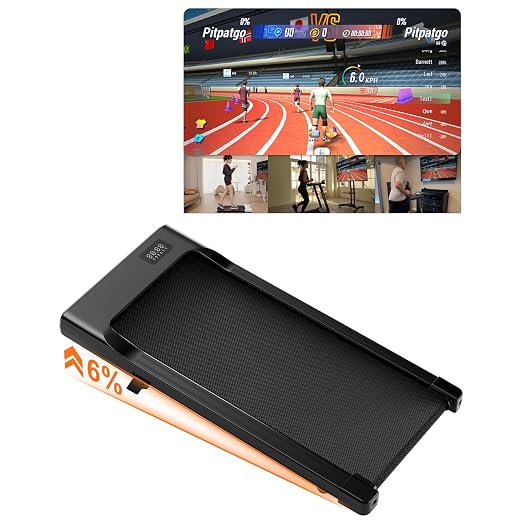
Superun Foldable Under-Desk Incline Treadmill
We liked the strong app integration and multiplayer features that make walking or light jogging more engaging. As an under-desk option it’s quiet and portable, but it’s designed for active walking rather than speed-focused runs.
Pros
- App-enabled workouts and multiplayer features
- 6% adjustable incline for added intensity
- Quiet 2.5 HP motor and compact, foldable design
Cons
- Limited top speed and horsepower for serious running
- Smaller belt and under-desk orientation reduce stride freedom
- Build and long-term durability are unclear for heavy daily use
Superun’s walking pad is targeted at users who want to mix desk work with regular movement or who enjoy app-driven, gamified workouts. The AI training, online events and wearable-device compatibility make it stand out in the under-desk category; we found the community and app features motivating for daily use.
What stood out during our testing
- 6% adjustable incline and a 2.5 HP motor supporting steady walking and light jogging
- App connectivity with AI training, multiplayer events and wearable-device compatibility
- Remote control and foldable, portable form factor for easy storage
We tested both solo sessions and app-led group events; the social angle adds stickiness to daily walking routines. The pad runs quietly and the shock-absorbing belt is kinder to joints than bare-floor walking.
Limitations to note
This is not a full-size treadmill for runners — the speed cap and shorter belt make it unsuitable for long, fast runs. If your primary goal is HIIT running or marathon training, look for models with higher horsepower and longer decks.
LONTEK 16% Manual Incline Walking Pad
We appreciated the unusually steep manual incline option for a budget walking pad — it’s great for short, intense hill simulations at a low price. However, the manual nature of the incline, compact belt and light-frame feel mean it’s best for walkers and light joggers rather than serious runners.
Pros
- Very affordable with a top 16% manual incline
- Quiet brushless motor and foldable design
- Space-saving footprint and transport wheels
Cons
- Incline is manual — not adjustable on the fly
- Narrow 40 cm belt limits comfortable running strides
- Build quality and warranty are modest compared with bigger brands
This model targets buyers who want a low-cost way to replicate steep uphill work at home. The 16% manual incline is the headline: by repositioning the pads you can simulate serious climbing effort without paying for motorised incline mechanisms. For walking and hill-focused intervals it’s surprisingly effective.
Quick specs that matter to us
- 0–12 km/h speed range with 3.0 HP brushless motor and three incline positions (0 / 8 / 16%)
- 40 cm running belt with 7-layer anti-slip surface and silicone shock absorption
- Foldable, lightweight design and transport wheels for easy storage
In practical use, the quiet motor (claimed ≤45 dB) and compact design make it a good apartment option. The manual incline requires stepping off to change settings, so it interrupts flow for interval workouts — this is the key trade-off compared with automatic incline treadmills.
Who should buy (and who should not)
We recommend this if you want an inexpensive machine for walking, incline walking and occasional jogging in a small space. Serious runners or anyone who needs automatic incline control and a wide running surface should consider more substantial models.
Final Thoughts
Our top pick is the NordicTrack Commercial 2450 Foldable Treadmill (9.3/10). It combines a large pivoting touchscreen, a wide speed and incline/decline range, and a heavy-duty frame that stays solid during long runs and hard intervals. Choose this if you want immersive iFIT sessions, dependable stability for fast running, and a machine that handles everything from recovery walks to steep hill repeats.
If your priority is the steepest automatic climbs for focused hill training, pick the Cursor 20% Auto-Incline Foldable Treadmill (7.6/10). Its true 20% auto incline and a 3.5 HP motor deliver intense, consistent hill intervals at home. We recommend the Cursor for athletes and seasoned trainers who need aggressive incline sessions and structured hill repeats.
(Quick runner-up note: for app-connected, everyday versatility with a quieter motor and cushioned deck, the Bowflex 8.5J is a reliable alternative.)



Thanks for including the cheap 16% incline foldable option. For someone living in a tiny apartment who wants steep incline walking, would that be a reasonable buy or too flimsy? I’m 5’3, 130 lbs.
For your size and purpose (steep incline walking in a compact footprint), the 16% incline foldable walking pad could be a reasonable and cost-effective choice. Just be mindful of the shorter belt and manual incline adjustments — it’s more suited to walkers than runners.
I bought a similar compact unit. It’s great for hill intervals and fits under my bed, but don’t expect the stability of a full treadmill. For 130 lbs and walking, you’ll probably be fine.
Make sure to check the manual incline mechanism before buying — some folks reported it being stiff at first. A good warranty helps.
Oops — double comment, but forgot to add: the 16% manual incline pad is surprisingly effective for short HIIT hill blasts. Manual adjustment is annoying mid-set though, so I rigged a quick pause routine between intervals. Works fine but not elegant 🤷♀️
Creative workaround! I usually just do incline blocks with time to adjust between them — saves the hassle.
Thanks for the tip — manual incline can disrupt interval flow. Some users pre-program micro-rests or use a second remote to speed adjustments. Definitely not as seamless as auto-incline models.
Small rant: I’m tired of treadmills promising ‘interactive’ screens when half the time you need a paid subscription to get the good workouts. The NordicTrack and ProForm are great on paper but the subscription model is annoying.
You’re not alone — many users appreciate the hardware but get frustrated by subscription gating for the best content. We try to call that out in reviews; if you want hardware-first without subscriptions, look for models with robust onboard programs or FTMS compatibility so you can use third-party apps without vendor lock-in.
Agree. I use public domain training plans and pair with apps like Zwift where possible. Saves cash but requires some setup.
Subscription fatigue is real. Try machines that support multiple app ecosystems (Bowflex and XTERRA are decent here).
Long post — apologies, but I wanted to share a little comparison from my own trial:
I tested XTERRA TRX4500 and a Bowflex T6 over 6 months. XTERRA felt more stable for hill repeats and had better incline range for steeper work. Bowflex won for quietness and connectivity (Zwift/JRNY). If you’re a runner who also loves tech, Bowflex is sweet; if you want raw incline and a solid deck, XTERRA was my pick.
Hope that helps anyone on the fence!
Thanks for the detailed comparison, Marcus — that’s exactly the kind of hands-on insight readers appreciate. Your take aligns with our testing notes too.
Warranty was about standard for both, but Bowflex had faster support turnaround in my region. YMMV.
Appreciate the write-up — makes the decision easier. Curious: any difference in warranty/service between the two?
Really helpful roundup — thanks! I’ve been eyeing the NordicTrack Commercial 2450 for months because of that big pivoting touchscreen and incline range. Does anyone know if the deck cushioning is good for daily runs? I run about 20–30 miles/week and I’m worried about joint impact.
Thanks, Emily — great question. The Commercial 2450 has a heavy-duty deck and adjustable cushioning; in our tests it felt very stable for long runs. If you’re doing 20–30 miles a week, consider adding a high-quality shock-absorbing mat under it for extra protection and check maintenance intervals for the belt.
I have the 1750 (similar tech) and it’s been surprisingly kind to my knees. Still, I supplement with weekly strength work for hips and calves — that helped more than swapping treadmills tbh.
I used a NordicTrack for a year; cushioning was fine but check incline motor strain if you do long steep workouts — some people report extra maintenance.
I bought the foldable 20% auto incline pad because my cabin has zero space. It’s brutal in a good way. A few thoughts:
– Motor handles short intense bursts fine
– Belt is wider than I expected for a walking pad
– Not for long runs, but excellent for hill conditioning
Also, the touch controls are kinda finicky sometimes. Anyone else had that?
If touch is a dealbreaker, some models offer a remote or app control — check that before buying.
Yep, touch controls were a little glitchy at first on mine too — after a couple firmware updates it improved. Worth checking.
Thanks for sharing, Natalie. Touch controls on compact pads can be hit-or-miss; keeping the software/firmware updated sometimes helps. For hill conditioning specifically, sounds like you made the right choice.
Okay this is petty but: anyone else think the product descriptions sound like treadmill soap operas? ‘Superior interactive training experience’ — inner drama aside, I actually want a quiet motor and stable incline, not motivational monologues from my treadmill 😂
Totally fair — marketing copy can oversell the experience. Focus on specs: motor power, incline range, deck size, and warranty. Those tell you more about real-world performance than taglines.
Also check user forums for real-world noise reports — makes a difference.
Haha, same. I muted the speakers on my old treadmill and enjoyed my own music. Specs over slogans!
Saw the review badge ‘Top pick for interactive training’ and I’m sold on the NordicTrack Commercial line. But does anyone find iFit classes repetitive after a while? I want variety that still challenges my hill workouts.
iFit has a large library and frequently updates content, but personal preferences vary. If you crave variety, consider mixing iFit with structured plans you import or using FTMS-compatible apps for custom workouts. Also, switching trainers and terrains helps keep it fresh.
I alternate iFit sessions with custom interval workouts I make in other apps — keeps things interesting.
Not a runner, but I loved the idea of the NordicTrack T Series for walking and family use. Affordable and seems feature-rich. Anyone used it with multiple user profiles for a household?
The T Series supports multiple profiles via the iFit ecosystem, so it’s practical for households. Profiles help keep workout history separated and tailor suggested sessions.
We have 3 profiles on our T Series; switching takes 10 seconds. Perfect for different training goals across family members.
Anyone else concerned about long-term service for the foldable walking pads? Their motors sound powerful (3.5HP) but I’ve seen mixed reviews about longevity. Real experiences welcome.
Valid concern. In our testing the higher-powered foldable pads performed well short term, but long-term reliability can depend on usage intensity and maintenance. If you plan heavy daily use, a full-sized treadmill with a sturdier frame may be a safer long-term investment.
I had a compact motor fade after two years of daily hill intervals. Warranty and vendor support are key — check return policy and spare parts availability.
Same here — great first year, issues in year two. Bought an extended warranty and it saved me.
Anyone tried the Bowflex T9? The 20 km/h top speed sounds tempting, but I’m more about steep hills and incline work. How does its incline compare to the NordicTrack or the 20% foldable pad?
I had a Bowflex for a while — incline is good for sustained hills, but the foldable 20% pad is more extreme if you want that steep burning feeling (though it’s more for short intervals).
Bowflex models (T6/T9) are excellent for app connectivity and have solid incline capabilities, but they don’t hit the 20% auto incline that the foldable walking pad advertises. For pure steep-incline focus, the 20% auto incline pad or the NordicTrack’s broad incline/decline range would be better.
Short and direct: if you want app integration + quiet deck, go Bowflex. If you want steep incline intensity, go 20% foldable pad. Both have trade-offs. Anyone disagree?
That’s a fair summary, Ethan. Bowflex excels at connected, quiet everyday workouts; the 20% foldable pad is niche for steep incline work. Choice depends on your primary training goal.
I second that — also consider warranty/service and expected usage frequency before deciding.
I lol’d at ‘Raceable 6% incline’ — 6% is enough to make you hate stairs again 😅. In seriousness, though, does anyone pair the Superun with external HR monitors? How accurate is the app syncing?
The Superun’s app integration is solid for pace and steps; HR monitor syncing varies by brand but it supports common Bluetooth options. For precise HR zones, pair with a chest strap — wrist sensors can lag during brisk walks.
I use a chest strap with mine and it syncs fine. Wrist-based readings on the app were… optimistic, lol.
Curious about the ProForm Carbon Pro 2000. Compact but supports fast running — has anyone compared it to the XTERRA TRX4500 in terms of stability for interval sprints?
The TRX4500 felt a bit more stable in our sprint tests thanks to the wider deck and sturdier frame. The ProForm Carbon Pro 2000 is a strong compact performer, but if you prioritize heavy interval sprints, XTERRA’s build gives it an edge.
I own the ProForm. Fine for 400m intervals, but you can feel a bit more flex compared to heavier machines. If you’re taller/heavier, go XTERRA or NordicTrack.
Quick Q: For someone who wants to alternate walking hills and occasional runs, which model is the best compromise? I’m 5’7, 150lbs, do light runs 3x week.
XTERRA if you like value; NordicTrack if you want that immersive iFit experience and a stronger build.
For a mix of walking hills and light runs, the XTERRA TRX4500 or the NordicTrack Commercial models are both good compromises — stable decks, good incline range, and FTMS/iFit compatibility. If budget and space are tighter, the ProForm Carbon Pro 2000 is a compact alternative.